Dear experts, |
Re: How to set object levels If your objects are like this: Object Level #1 1 #2 2 #3 2 #4 3 #5 4 #6 3 #7 2 #8 4 Then the following is how you get there: move(#2 below #1); move(#3 after #2); move(#4 below #3); move(#5 below #4); move(#6 after #4); move(#7 after #3); error(#8 cannot have level 4 since there is no level 3 object below #7 to hang it on). Thus, an object's desired 'level' cannot be more than one greater than the one immediately preceding it. the first object must be level 1. If your object's are already in the desired display order and you have an attribute reflecting the object's desired level, then you need a clever DXL to keep track of which object is the more recent at each level, erasing those that have been superceded by a lower level object. In the above example, when you are ready to deal with #6, your latest-vector would look like {null, #1, #2, #4, #5, null, null, null, null, null, ...}, where the first 'null' represents illegal level zero, object #5 is the latest level 4 object, and you have as many trailing null positions as max levels you may need. After dealing with #6, then "#6" replaces "#4" as level 3 and you erase #5 since there is no longer a valid latest level 4. When its time to move the object to its position, you find the latest object at its level and insert it 'after' that object; if there is no object at its level you insert it 'below' the object one level higher. Someone write a script to do this.
|
Re: How to set object levels llandale - Fri Oct 30 13:00:34 EDT 2009
|
Re: How to set object levels llandale - Fri Oct 30 13:00:34 EDT 2009
#include <example/include/dbs.inc> #include <example/include/tables.inc> #include <example/include/levels.inc> #include <example/include/sort.inc> #include <example/include/attribs.inc> // move objects to correct levels menuStatus(current, "Placing objects at correct levels ....") refresh current fixObjectLevels menuStatus(current) refresh current |
Re: How to set object levels SystemAdmin - Mon Nov 02 03:25:39 EST 2009 What would be the preconditions?.in which column levels are mentioned? Could you please put complete code. Thanks a lot in advance. |
Re: How to set object levels JayashreeRaddi - Thu May 05 05:08:40 EDT 2011
I am assuming that we have to first create a new DXL attribute called "Level" with the code: obj.attrDXLName = level obj
|
Re: How to set object levels bullbala - Thu May 05 05:34:53 EDT 2011
I am assuming that we have to first create a new DXL attribute called "Level" with the code: obj.attrDXLName = level obj
Alternatively, we could also create an attribute called "Level" of type "Integer" and then run the following script:
Object o

for o in entire current Module do
    o."Level" = level o
|
Re: How to set object levels bullbala - Thu May 05 05:49:43 EDT 2011
Alternatively, we could also create an attribute called "Level" of type "Integer" and then run the following script:
Object o

for o in entire current Module do
    o."Level" = level o
Thanks a for the reply. I want write in value is attribute "Object Level" so the hierarchy will be set automatically. Ex in attribute "Object Level" i want to put 1-> 1st level 2-> 2nd level place child of the above object 3-> this the child of the 2nd object 3-> this is in same level as above 3rd level 2-> moves to the second level I assume if i somehow write values in the attribute Object Level hierarchy will be set automatically! correct me if i am wrong. |
Re: How to set object levels JayashreeRaddi - Fri May 06 02:22:32 EDT 2011 Mathias Mamsch, IT-QBase GmbH, Consultant for Requirement Engineering and D00RS |
Re: How to set object levels Mathias Mamsch - Fri May 06 04:43:36 EDT 2011 Mathias Mamsch, IT-QBase GmbH, Consultant for Requirement Engineering and D00RS Thanks a lot for correcting me..but it is so painfull to set levels manualy (copy paste one below the other for all lines). Hope there could be other/better way to set heirarchy :-) |
Re: How to set object levels JayashreeRaddi - Mon May 09 02:16:17 EDT 2011 Promote Object (Ctrl+Alt+Left) Demote Object (Ctrl+Alt+Right) It is definitely much better than copy + paste ! |
Re: How to set object levels bullbala - Mon May 09 03:03:51 EDT 2011
Golly, how did I miss that.
Sensitivity    clbkSensitivity()
{   return(ddbAvailable)
}

DB      dbPromote = create("Promote/Demote")

startConfiguringMenus(dbPromote)
// createButtonBar("Promote", clbkSensitivity, true, true)
createMenu(alwaysOn, "Promote/Demote", null char, null)

createItem objPromoteItem
createItem objDemoteItem
end menu
// end buttonbar
show(dbPromote)
|
Re: How to set object levels llandale - Mon May 09 10:42:38 EDT 2011
Golly, how did I miss that.
Sensitivity    clbkSensitivity()
{   return(ddbAvailable)
}

DB      dbPromote = create("Promote/Demote")

startConfiguringMenus(dbPromote)
// createButtonBar("Promote", clbkSensitivity, true, true)
createMenu(alwaysOn, "Promote/Demote", null char, null)

createItem objPromoteItem
createItem objDemoteItem
end menu
// end buttonbar
show(dbPromote)
May be it is help full to you. Please find the attached file..its too big :-( Attachments attachment_14615672_Import_From_Excel.dxl |
Re: How to set object levels JayashreeRaddi - Wed May 11 10:47:33 EDT 2011 |
Re: How to set object levels bullbala - Wed May 11 10:59:40 EDT 2011 No, it is correct one. This code helps you to set hierarchy. please check once again. |
Re: How to set object levels JayashreeRaddi - Thu May 12 03:54:17 EDT 2011
ok, lets make a function to 'set' the object level ... You need to make sure that filtering is turned off, and that table cells are not shown before. So this should get very close to the 'setting the object level' function that you wanted to have.
// ***************** set levels function **************
void setLevel (Object o, int iLevel) {
   current = module o
   if (showTables module o) showTables false
   if (filtering module o) filtering false

   print "Setting level of " (identifier o) " to " iLevel "\n"
   Object oPrev = previous o
   if (null oPrev) {
    if ( iLevel != 1)
                error "First object must have level 1!"
        else
                return // object 1 has alway level 1 so ignore that one
   }

   int iPrevLevel = level oPrev
   if (iLevel > iPrevLevel + 1) {
        error "Cannot set level of object " (identifier o) ". Previous level to low!\n"
   } else if (iLevel == iPrevLevel + 1) {
        // print "Moving " (identifier o) " below " (identifier oPrev) "\n"
      move (o, below oPrev)
   } else if (iLevel == iPrevLevel) {
      move (o, after oPrev)
   } else {
      // find first object before with level = iLevel

        Object oSearch = oPrev; oPrev = null
      while (true) {
                oSearch = previous oSearch
                if (null oSearch) break
                if (level oSearch == iLevel) { oPrev = oSearch; break }
      }
        if (null oPrev) error "Cannot find object with level " iLevel " before object " (identifier o) "\n"
        // print "Moving " (identifier o) " after " (identifier oPrev) "\n"
        move (o, after oPrev)
   }
}
// ******************************************************

// Test it ... create a module with maxSize objects
int maxSize = 250
string errMsg
Module m = null

string sModName = "Object Level Test Module"
if (!null module sModName) {
    softDelete module sModName
    hardDelete module sModName
}

if (!null (errMsg = create(sModName, "", "PREF_", 1, m) ) || null m) error "Cannot create module: " errMsg "\n"
current = m
showExplorer false

// create 1000 objects ...
refresh m
Object o
int i; for i in 0:maxSize-1 do {
    o = (i == 0) ? create m : create last m
    o."Object Text" = (i+1) ""
}

// now set the levels for the objects randomly
int curLevel = 1
for i in 1:maxSize do {
      // set the level for the object
      setLevel(object i, curLevel)

      int mode = random(2)
      // 50% change set it to a random level between 1..(curlevel-1)
      if (mode == 0) {
            if (curLevel > 1) curLevel = 1+random(curLevel-1)
      } else if (mode == 1) {
            // 50% change to increase it by 1
            curLevel ++
      }
}

showExplorer true
Mathias Mamsch, IT-QBase GmbH, Consultant for Requirement Engineering and D00RS
|
Re: How to set object levels Mathias Mamsch - Thu May 12 07:23:56 EDT 2011
ok, lets make a function to 'set' the object level ... You need to make sure that filtering is turned off, and that table cells are not shown before. So this should get very close to the 'setting the object level' function that you wanted to have.
// ***************** set levels function **************
void setLevel (Object o, int iLevel) {
   current = module o
   if (showTables module o) showTables false
   if (filtering module o) filtering false

   print "Setting level of " (identifier o) " to " iLevel "\n"
   Object oPrev = previous o
   if (null oPrev) {
    if ( iLevel != 1)
                error "First object must have level 1!"
        else
                return // object 1 has alway level 1 so ignore that one
   }

   int iPrevLevel = level oPrev
   if (iLevel > iPrevLevel + 1) {
        error "Cannot set level of object " (identifier o) ". Previous level to low!\n"
   } else if (iLevel == iPrevLevel + 1) {
        // print "Moving " (identifier o) " below " (identifier oPrev) "\n"
      move (o, below oPrev)
   } else if (iLevel == iPrevLevel) {
      move (o, after oPrev)
   } else {
      // find first object before with level = iLevel

        Object oSearch = oPrev; oPrev = null
      while (true) {
                oSearch = previous oSearch
                if (null oSearch) break
                if (level oSearch == iLevel) { oPrev = oSearch; break }
      }
        if (null oPrev) error "Cannot find object with level " iLevel " before object " (identifier o) "\n"
        // print "Moving " (identifier o) " after " (identifier oPrev) "\n"
        move (o, after oPrev)
   }
}
// ******************************************************

// Test it ... create a module with maxSize objects
int maxSize = 250
string errMsg
Module m = null

string sModName = "Object Level Test Module"
if (!null module sModName) {
    softDelete module sModName
    hardDelete module sModName
}

if (!null (errMsg = create(sModName, "", "PREF_", 1, m) ) || null m) error "Cannot create module: " errMsg "\n"
current = m
showExplorer false

// create 1000 objects ...
refresh m
Object o
int i; for i in 0:maxSize-1 do {
    o = (i == 0) ? create m : create last m
    o."Object Text" = (i+1) ""
}

// now set the levels for the objects randomly
int curLevel = 1
for i in 1:maxSize do {
      // set the level for the object
      setLevel(object i, curLevel)

      int mode = random(2)
      // 50% change set it to a random level between 1..(curlevel-1)
      if (mode == 0) {
            if (curLevel > 1) curLevel = 1+random(curLevel-1)
      } else if (mode == 1) {
            // 50% change to increase it by 1
            curLevel ++
      }
}

showExplorer true
Mathias Mamsch, IT-QBase GmbH, Consultant for Requirement Engineering and D00RS
Chris Annal SW Test Engineer / DOORS Database Administrator Sensis Corporation, East Syracuse, New York chrisa@sensis.com |
Re: How to set object levels ChrisAnnal - Thu May 12 09:53:54 EDT 2011 Chris Annal SW Test Engineer / DOORS Database Administrator Sensis Corporation, East Syracuse, New York chrisa@sensis.com |
Re: How to set object levels ChrisAnnal - Thu May 12 09:53:54 EDT 2011 Chris Annal SW Test Engineer / DOORS Database Administrator Sensis Corporation, East Syracuse, New York chrisa@sensis.com |
Re: How to set object levels ChrisAnnal - Thu May 12 10:01:50 EDT 2011 -russ Attachments attachment_14616302_doors_tech_tip_-_importing_spreadsheets.doc |
Re: How to set object levels ChrisAnnal - Thu May 12 10:01:50 EDT 2011 -russ Attachments attachment_14616304_Build_Hierarchy_22.zip |
Re: How to set object levels rmoskwa - Thu May 12 13:00:12 EDT 2011 This is supreb...Thanks a lot. Perfectly works as I expected. |
Re: How to set object levels rmoskwa - Thu May 12 13:04:41 EDT 2011 I am looking for a DXL which can set the Object Level. It seemed that the DXL you published would help to resolve my problem. I tried it and got an error. Attached is my spreadsheet (from one production module). Would you please advise how to fix the problem. Thanks. Lynn Melbourne Attachments attachment_14683869_OBJ_LEVEL_EX.CSV |
Re: How to set object levels SystemAdmin - Sun Sep 18 07:20:53 EDT 2011 Mathias Mamsch, IT-QBase GmbH, Consultant for Requirement Engineering and D00RS |
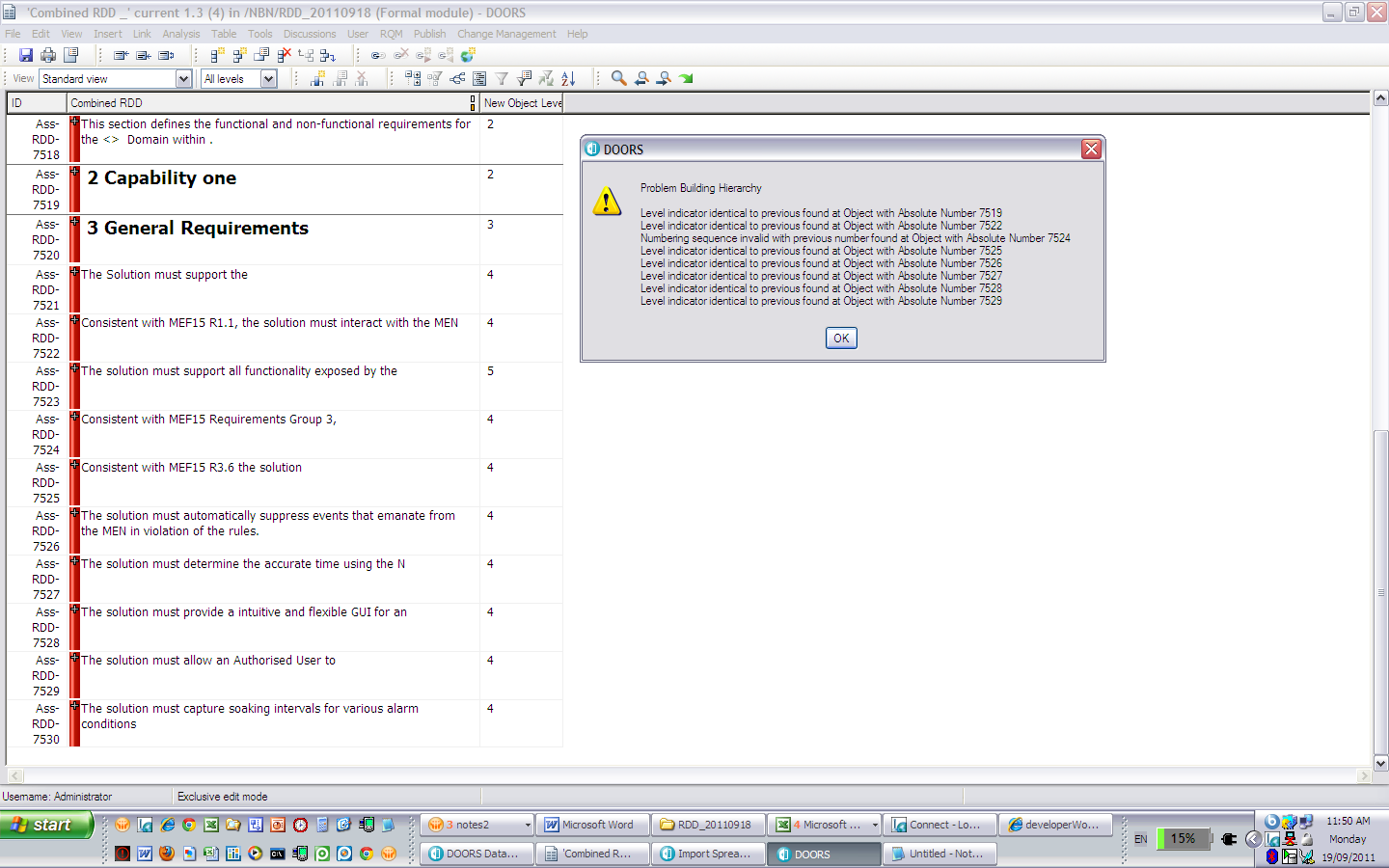
Re: How to set object levels Mathias Mamsch - Sun Sep 18 08:56:10 EDT 2011 Mathias Mamsch, IT-QBase GmbH, Consultant for Requirement Engineering and D00RS Thanks for the reply. I used the spreadsheet to import the requirments in DOORS and then used the attribute "New Object Level' to run the 'Rebuil Hierachy'. Error was detected. Pls see the attached doc. Would you please advise. Thanks. Attachments attachment_14683922_Hier_Error.bmp |
Re: How to set object levels SystemAdmin - Sun Sep 18 21:55:00 EDT 2011 Mathias Mamsch, IT-QBase GmbH, Consultant for Requirement Engineering and D00RS |